> ## Documentation Index
> Fetch the complete documentation index at: https://docs.practicemate.com.au/llms.txt
> Use this file to discover all available pages before exploring further.
# Find frequent visitors
> Build a Recipe for patients with three or more visits in the last two years.
This guide builds on the first Recipe and adds a more powerful idea: an **ingredient**.
You will find:
**Active male patients aged 50 or older who have had 3 or more visits in the last 2 years.**
This is only an example. Your practice might use the same pattern to find patients with a certain number of visits, prescriptions, observations, reports, reminders, appointments, or other related records.
## Start with the first Recipe
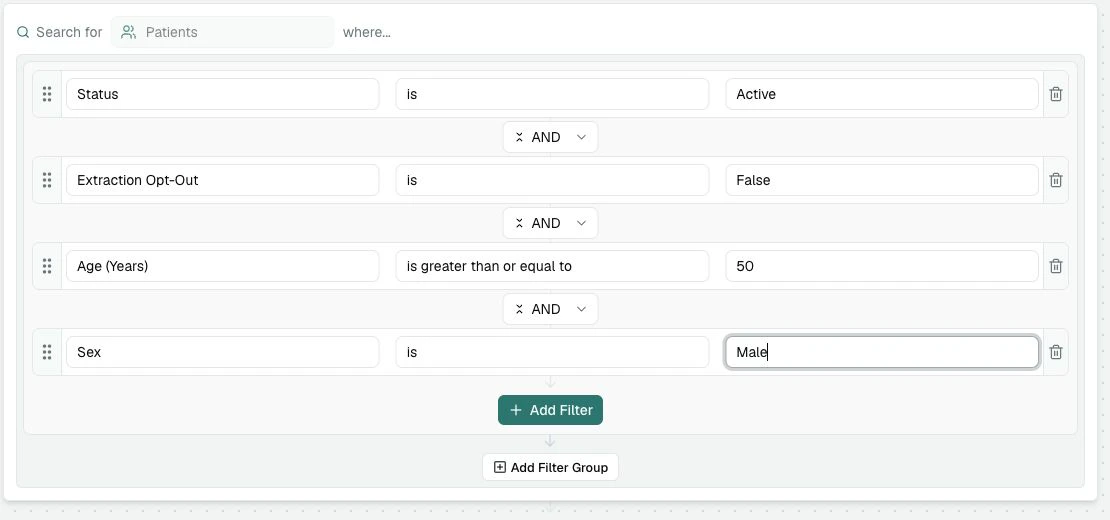
Begin with the Recipe from [Create your first Recipe](/recipes/first-recipe):
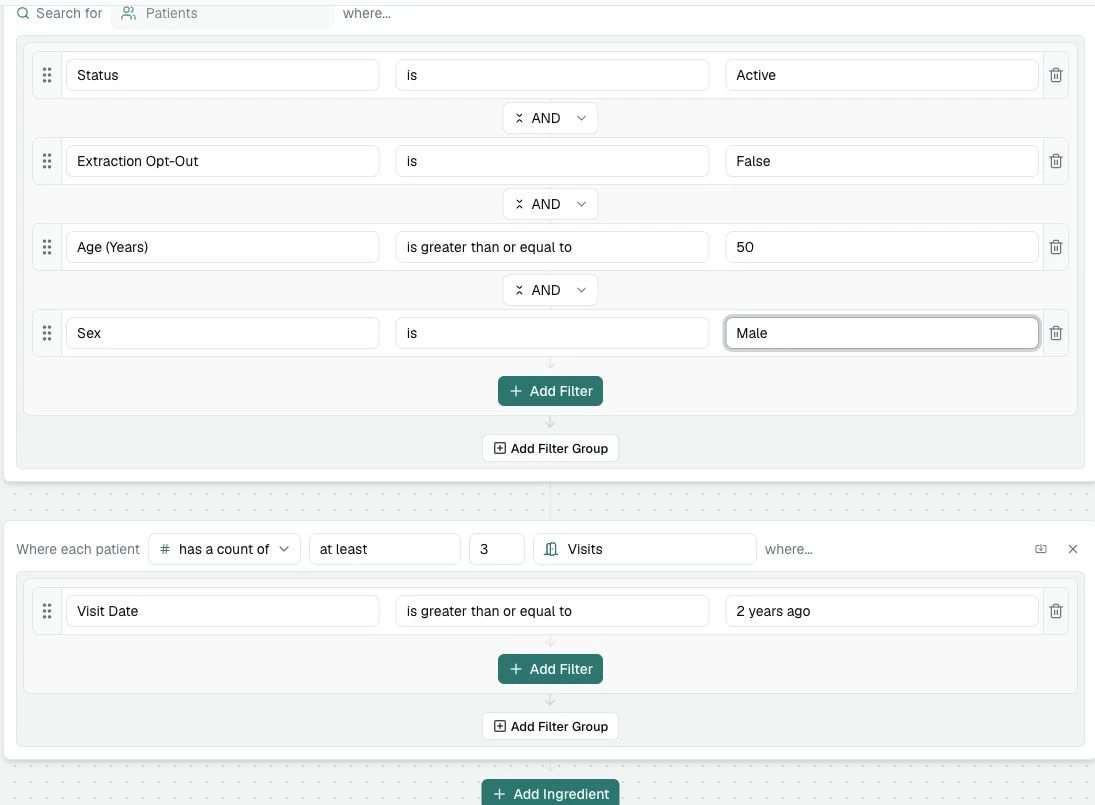
* Status is Active
* Extraction Opt-Out is False
* Age (Years) is greater than or equal to 50
* Sex is Male
Then add the visit-history ingredient below it.
 ## Add a Visits ingredient
Under the patient filters, select **Add Ingredient**.
## Add a Visits ingredient
Under the patient filters, select **Add Ingredient**.
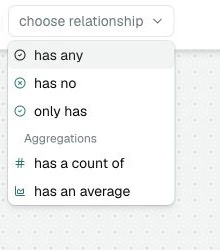
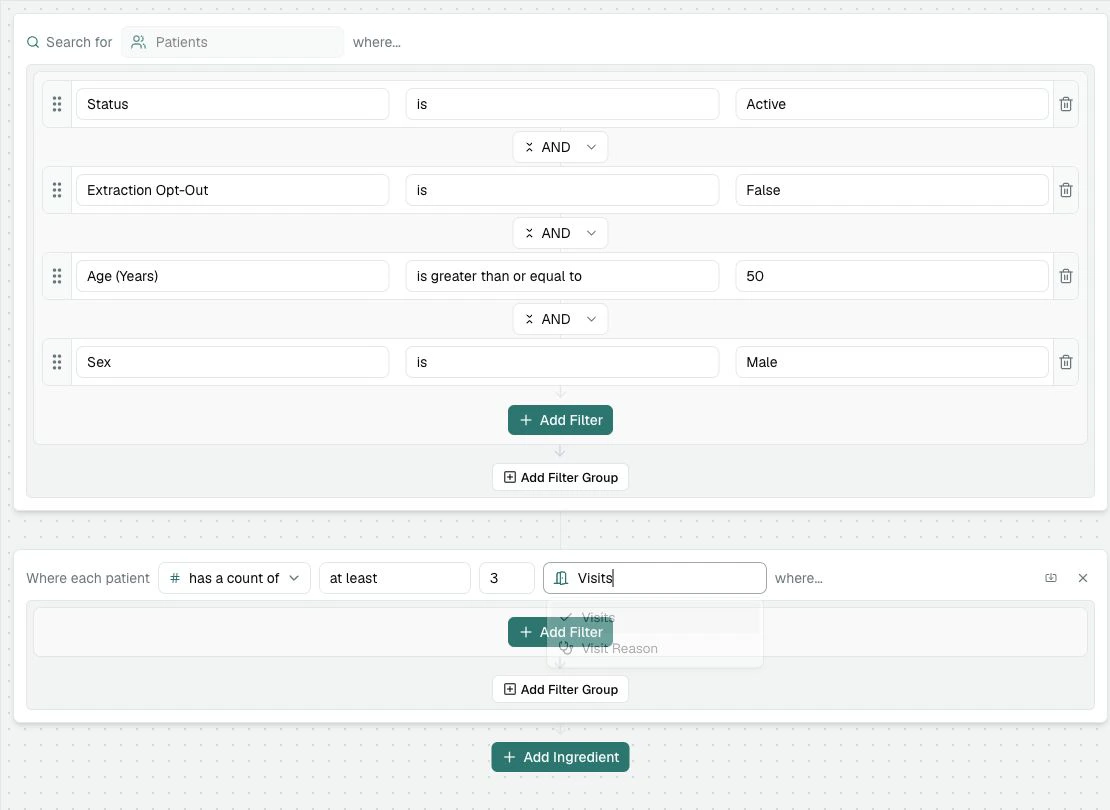
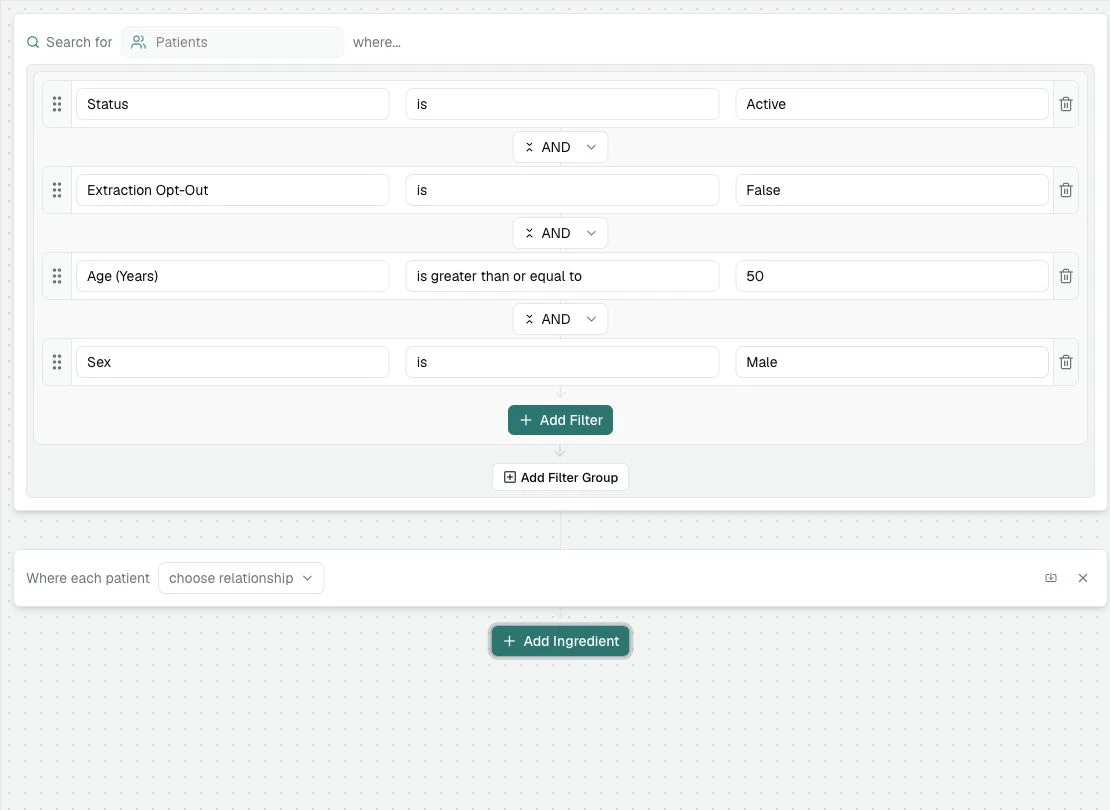 In the relationship box, choose **has a count of**.
 Choose **at least**, then enter **3**.
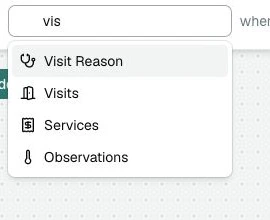
Select **Visits**.
Choose **at least**, then enter **3**.
Select **Visits**.
 At this point, the ingredient says:
**Where each patient has a count of at least 3 Visits where...**
The "where..." part is important. Without it, PracticeMate would count all visits, not just recent visits.
At this point, the ingredient says:
**Where each patient has a count of at least 3 Visits where...**
The "where..." part is important. Without it, PracticeMate would count all visits, not just recent visits.
 ## Limit the count to the last two years
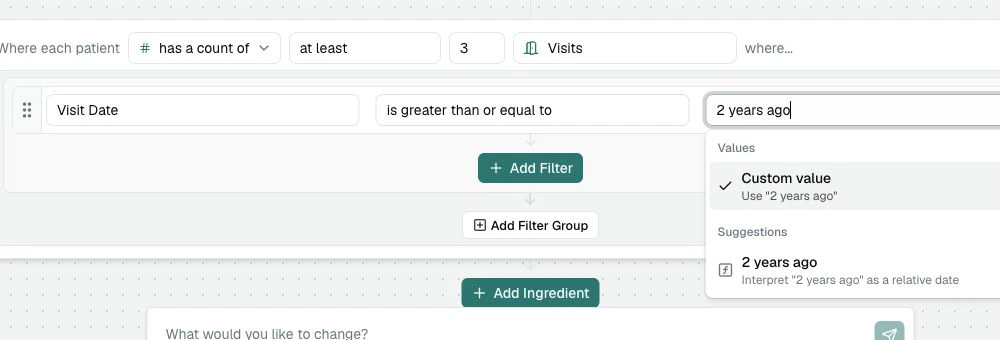
Add a filter inside the Visits ingredient:
Use the **Add Filter** button inside the Visits card, not the one in the Patients section.
Select **Visit Date**.
Select **is greater than or equal to**.
Type **2 years ago** in the value box. If PracticeMate offers a relative-date suggestion, choose it.
## Limit the count to the last two years
Add a filter inside the Visits ingredient:
Use the **Add Filter** button inside the Visits card, not the one in the Patients section.
Select **Visit Date**.
Select **is greater than or equal to**.
Type **2 years ago** in the value box. If PracticeMate offers a relative-date suggestion, choose it.
 Your Recipe should look like this:
 ## Read the Recipe back
Before testing, read the Recipe in plain English:
> Find active patients who have not opted out, are male, are aged 50 or older, and have at least 3 visits where the visit date is within the last 2 years.
That read-back is a useful habit. If the sentence sounds wrong, the Recipe probably needs adjusting.
## Test before saving
Select **Test**.
If the result is unexpectedly high, check that **Visit Date** is inside the Visits ingredient. If the result is unexpectedly low, check that the relationship says **has a count of at least 3**, not **has any** or **has no**.
The Visits filter belongs inside the ingredient because it controls which
visits are counted. A Visit Date filter outside the ingredient would be a
different kind of Recipe.
## Save the Recipe
Use a name that explains the purpose:
**Active male patients aged 50+ with 3+ visits in 2 years**
Then select **Save**.
For Recipes that will be used by other team members, include the timeframe in
the name. "3+ visits in 2 years" is clearer than "frequent visitors".
Because this Recipe has more moving parts, Version history can be especially helpful. If your team later adjusts the visit count, timeframe, or ingredient, the previous saved version remains available so you can review it and restore it if needed.
Older versions remain available for 365 days.
## What you learned
You used:
* **Add Ingredient** to look at related records
* **has a count of** to count those related records
* **at least 3** to set the minimum count
* **Visits** as the related table
* **Visit Date** to limit which visits are counted
* a relative date, **2 years ago**
The same pattern works for many Recipe questions: choose the related record type, choose whether the patient must have it, must not have it, or must have a certain number of it, then add filters inside that ingredient.
## Read the Recipe back
Before testing, read the Recipe in plain English:
> Find active patients who have not opted out, are male, are aged 50 or older, and have at least 3 visits where the visit date is within the last 2 years.
That read-back is a useful habit. If the sentence sounds wrong, the Recipe probably needs adjusting.
## Test before saving
Select **Test**.
If the result is unexpectedly high, check that **Visit Date** is inside the Visits ingredient. If the result is unexpectedly low, check that the relationship says **has a count of at least 3**, not **has any** or **has no**.
The Visits filter belongs inside the ingredient because it controls which
visits are counted. A Visit Date filter outside the ingredient would be a
different kind of Recipe.
## Save the Recipe
Use a name that explains the purpose:
**Active male patients aged 50+ with 3+ visits in 2 years**
Then select **Save**.
For Recipes that will be used by other team members, include the timeframe in
the name. "3+ visits in 2 years" is clearer than "frequent visitors".
Because this Recipe has more moving parts, Version history can be especially helpful. If your team later adjusts the visit count, timeframe, or ingredient, the previous saved version remains available so you can review it and restore it if needed.
Older versions remain available for 365 days.
## What you learned
You used:
* **Add Ingredient** to look at related records
* **has a count of** to count those related records
* **at least 3** to set the minimum count
* **Visits** as the related table
* **Visit Date** to limit which visits are counted
* a relative date, **2 years ago**
The same pattern works for many Recipe questions: choose the related record type, choose whether the patient must have it, must not have it, or must have a certain number of it, then add filters inside that ingredient.